Not Sure Where to Start? The 4 Systems Every Solopreneur Needs
I remember the first time I went to see my accountant. I was around 19 or 20, and figured it was time for me to treat my side hustle of building websites as an actual business.
I had been reading books on how to start a business, and one talked about the Shoebox Method for accounting: just shoving all of your receipts into a shoebox for your accountant to sort out later.
That sounds like madness, but I thought I’d play a little joke on my accountant (a family friend) and tell him that’s what I was doing. I’ll never forget the look on his face — wide eyes, mouth agape, cold sweat forming on his brow — before I told him I was just kidding and had a spreadsheet, to go with a folder of the receipts in my bedroom (slash office).
Even back then — over 20 years ago — I knew the importance of having some system. I was a pretty sloppy kid, but in my business and school work, I was very organized.
I knew I had to be if I was going to be good at anything.
Years later, before I got connected with my now long-time accountant, Rachel, I actually met with someone local who told me my accounting system was so good that he didn’t think I needed him. My strong suspicion is that he didn’t want to do small business accounting, but it was still a nice compliment.
To be honest with you, I didn’t think I was doing anything special. Surely everyone thought in this way, right? How can they spend the least amount of time creating something great?
But last year I did a series of customer calls that made it very clear this was not a common trait.
“I Don’t Know Where to Start”
Throughout these calls, I got perhaps the most important feedback I’ve gotten since moving away from web development:
I read all your stuff and I’m always like, this sounds awesome, but I don’t even know where to start or how to ask.
And it came up more than once. So today I want to show you where to start. I’ll walk you through 4 systems every solopreneur should have:
- Admin Work
- CRM (and Client Experience)
- Content
- Idea Generation and Capture
Let’s start with Admin Work.
System #1: Admin Work
This is first because it can potentially have the biggest impact. You should have a system for capturing your daily work:
- Calendar events
- Notes
- Tasks
- Actionable Items from meeting notes
Luckily there are default apps for pretty much all of these — but a system isn’t just a bunch of tools. It’s making them work together. Specifically:
- How can you protect the time on your calendar so you can do your best work?
- How are you capturing tasks into a task manager you actually use?
- Are you able to quickly capture notes and put them someplace where they don’t get lost to history?
- How are you getting your most important action items from meetings while still being fully present?
The reason so many different tools exist is that this is a very personal process. For example, I gladly pay for Fantastical every year because it handles large numbers of calendars the best, and I have 20+ calendars across my personal and work life.
When I do my weekly budgeting, I can hide all calendars except my Bills calendars (as the name suggests, what day each bill is due, and how much it is). During work hours, I only see the calendars that impact my work day. Outside of work, I only see personal/family/school calendars.
The same thing goes for tasks and notes. I love Obsidian for notes because it’s so versatile. But I have friends who feel (like I once did) that it’s too complicated. They use the default notes app on their phone because that’s what they know they’ll actually use.
As you build this system, it’s important to know the answer to this question:
When do you work best? Optimize for doing your best, most focused work at these times.

One great way to figure this out is through something called task journaling. You set out to perform 3 tasks in a day, and check in with yourself throughout the day to see when you’re feeling most vs. least productive.
When it comes to info gathering and review:
- What will help surface the information you need when you need it?
- What will help you capture information quickly so you don’t forget it?
- What will help simplify, not overcomplicate, your process?
Your Foundational System
The reason we covered this one first is because it’s foundational. You should use your task manager for all tasks, not just specific ones. You should keep all of your notes in your notes app. And a good system for email and calendar management will affect all the work you do.
One way to keep your admin systems on track is to have a weekly planning session, where you review tasks, appointments, and notes.
Every other system can build on what you have for admin work. A really good example is the CRM System.
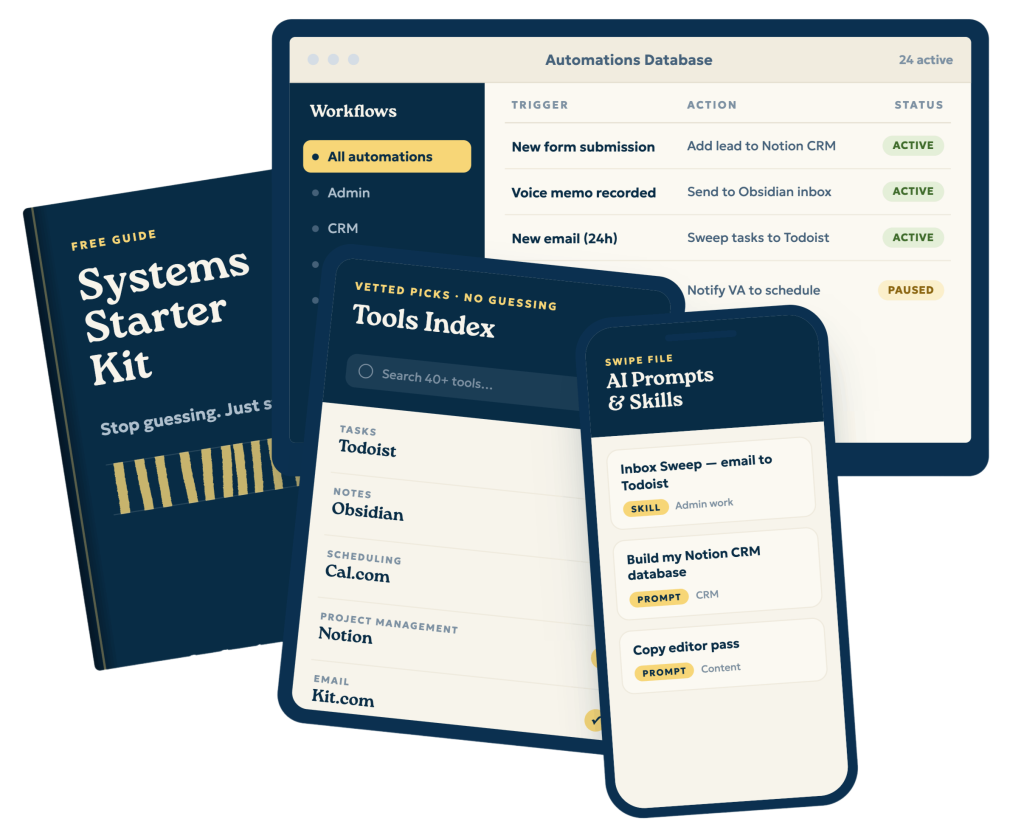
Do you want the FULL Systems Kit, with recommended systems tools, automations, and prompts?
System #2: CRM
CRM stands for Customer Relationship Management, and most simply, it’s a way to capture, nurture, and convert leads into customers/clients. While entire industries and enterprises are based on this niche, your CRM does not need to be a complicated system.
I always recommend starting with something simple so you actually use it. Big honkin’ CRMs can be super overwhelming and require a lot of access to other accounts right off the bat. This is exactly what prevented me from actually implementing a CRM in my business for a long time — until I built something basic in Notion. You can use Trello, Notion, Google Sheets, or whatever works best for you. If you do want a complete, soup-to-nuts solution, HubSpot is free to start, which makes onboarding pretty painless.
The idea here is you want a way to track people who could potentially buy from you, or have bought from you. I use my CRM to keep everything from contact history to personal notes, and videos I’ve sent them.
This ensures that you’re building relationships, but also that you’re following up and showing people you’re the solution they need, when they’re ready for it.
Don’t underestimate the act of following up.
In 2025, I added $20,000 to Q4 simply by following up with leads from earlier that year. Most people won’t “just reach out” when they need you. Most need a nudge from time to time.
A few simple requirements:
- People should be able to fill out a form and automatically get sent to your CRM.
- Have a way to set reminders about follow-ups so you don’t forget.
- Track status — this will allow you to see how effective your outreach and sales calls are.
- Make it something you’ll actually use!
Start simple at first. If a Google Sheet is where you’re comfortable, then do that. You can always upgrade later. Especially since Sheets exports to csv, which is a near-universal format for table data.
Let’s talk about forms
The way I see it, in this context there are 3 kinds of forms:
- Call scheduler. These are your warmest leads, and people who have a very real chance of giving you money. These will allow you to send the call booking info to your CRM so you can track tangible calls.
- Mailing list opt-ins. A way for people to join your mailing list, giving you a way to nurture them and get them to book with or buy from you when they’re ready.
- Lead capture forms. This allows people to raise their hand and say they want to work with you.
Depending on the CRM you choose, many of these forms can be built-in or easily automated with Zapier.
You can get more recommendations and the entire Solopreneur Systems Starter Kit here.
Client Onboarding/Experience
Something I considered adding to this was a “Client Experience” system, but after careful consideration, I determined that each niche, and each solopreneur, likely has a fairly personal approach to client onboarding. However, there are some things you should consider as you build yours out:
- First, what’s something you’ll actually use?
- How is the system communicated to the client? In other words, what are you doing to manage expectations?
- How much technical knowhow and support will they need to use your system?
- Are you trying to be clever when clear will do?
- What actually serves your clients best and how can you balance that with what works best for you?
System #3: Content Creation
If you’re a solopreneur, you’re likely creating some sort of content: videos, podcast, articles, newsletter, etc. Having a good system in place for this is important to be consistent without feeling overwhelmed.
Much like with Client Experience, each solopreneur’s content creation process looks different. That’s why Standard Operating Procedures (or SOPs), good tools, and process automation are really important here. Think about:
- How you capture ideas (more on that in the next system)
- What the idea approval process looks like
- How you’re tracking the status of multiple pieces of content
- What tools you use to create the content
- How the content is getting edited and reviewed
- How and when it’s getting published
- What goes into publishing it
- How you’re promoting it
- The ultimate goal of the content
I want to address that last point first because it will dictate how often you publish and on what platforms. It should also determine your CTA — and how people who follow that CTA get into your CRM.
My goal is always to get people on my mailing list…maybe you could tell because there are multiple CTAs in this article. If your goal is growth, maybe asking for likes, subscribes, and comments on YouTube is more important.
The Publishing Process
Having a system that allows you to look at your content schedule, review everything, and then record is really important for you to batch content. Otherwise, you’re just running around every week going, “What am I going to talk about? How am I going to talk about it?” And that increases the length of the content creation process.
I recommend setting aside one day every week to create the content. My dedicated recording day is Monday. I have no meetings, and the kids are out of the house (even in the summer) so I know it will be quiet.
Once you know your schedule, you should consider the tools you are using to create the content. What works best for you? Is it your iPhone? Do you prefer yapping?
And how is that content getting edited and reviewed? In my system, editing is really easy because I do a lot of stuff on the front end to make sure I don’t have to edit on the back end.
I recommend creating a Standard Operating Procedure (SOP) for this.
Creating Your Content SOP
Since this process can be so different per person, it would be a good exercise for you to figure out your own by creating your SOP. There are likely several stages of the process, so what I recommend is for each stage, record a video of you performing the work, and narrate what you’re doing. You can use an app like Tella or Loom.
For each video (or SOP), you should go through 4 things:
- What is the purpose of the task?
- What are the inputs? As in, what data do you need to perform the task? What does this look like at the beginning?
- What are the steps you need to take to perform the task?
- What is the output? As in, what is the end state, after you’ve performed the task.
Once you do this for the task, take the video, transcribe it, throw the transcript into Claude or your favorite LLM, and ask it to write out the steps. Then review it for accuracy.
After that — congrats! You have your first SOP.
Repurposing Content
I want to talk about repurposing for a second, because it seems like a slam-dunk way to get more mileage out of your content, and it can be. But we need to remember one important rule: make content for the people on the platform.
As much as LinkedIn wanted video to work, people on LinkedIn didn’t want video. So repurposing long-form video into short-form on LinkedIn (or even cross-posting from TikTok to LinkedIn) is probably a waste of time.
I like to repurpose ideas, not necessarily the content. So if I have an idea, say, about how to create a planner in Notion for your content creation system, I’ll write the tutorial. I’ll record the video using the tutorial as an outline but not necessarily a script. I’ll use the headlines in the tutorial for the broad strokes of a short-form video. I’ll take the main beats and turn it into a LinkedIn post.
This is far better than recording the video, and having AI generate the tutorial, and having AI clip parts of the video out of context to post. Each piece of content should be able to stand on its own.
On AI
I’ve basically written a treatise on using AI in creative work. The line is going to be different for everyone, but I firmly believe AI shouldn’t touch any of my content until post-production. Systems help us stay consistent, not a word robot creating vanilla cake that we add some icing to.
My entire Solopreneur Systems Starter Kit has a comprehensive section on content creation, where I also suggest systems for writing, podcasting, and video production.
System #4: Idea Generation and Capture
For our 4th and final system every solopreneur should have, I want to talk about idea generation and capture. We all have ideas, after all.
Now, you might be wondering why I didn’t include this in either Admin work or Content Creation. Notes, tasks, content ideas. Seems like it would slot in nicely in either of those systems…or both. And that’s the real reason it’s its own system. Ideas can go into admin work, content creation, or CRMs.
Maybe you think of a solution for a client, or a type of client to reach out to. Maybe it’s a follow-up idea. I would say these belong in your CRM, not as part of admin work or content creation.
Second, not every idea should be clogging up the work that you’ve fully vetted as work you should be doing. A lot of ideas solopreneurs have throughout the day are either things that should be back-burnered or thrown out. As my friend Alex Sanfilippo says, we need to “keep the main thing the main thing.”
But that doesn’t mean those ideas should be lost in the void. I mean…they need a chance, right?
The most important part of this system is the ability to capture ideas quickly and conveniently. Most people think, “if the idea is good enough, it will come back to me.” That is demonstrably not true (for most people). I operate under the assumption that if I don’t capture it now, it’s gone forever. As I was writing this, Seth Meyers said this exact thing on The Lonely Island and Seth Meyers Podcast:
For any young person who is a writer, I cannot tell you the value of what Andy did there. Anytime you have dumb ideas that you’re like, well, I won’t forget these. They’re too dumb. Writing it down, emailing it to yourself, having a rolling just notes app on your phone for the dumbest ideas.
…The amount that I go to bed being like, oh, that’s…good, but I’m so tired I’m not going to write it down now. And then you wake up and you’re like, well, gone forever.
So what do you need for a good idea capture system? First, it’s worth thinking about these questions:
- What devices do you use (and usually have on you)?
- What apps do you use to take notes?
- What apps are you using with other systems we’ve outlined here?
- Do you prefer to write, type, or talk ideas?
- How do you evaluate ideas?
As with any of these systems, it’s only good if you use it. For example, a crucial part of my system is being able to capture ideas hands-free. Often I’m driving, managing kids, or walking the dog and don’t always have a free hand. I know I can shout to Siri. If Siri fails, I can also push the action button on my Apple Watch, which will activate Whisper Memos.
You can see me walk through my entire voice capture system here:
My general recommendation is to have 1-2 clear ways to capture ideas, and make sure they always go to the same place, that way they’re easier to review.
Using Your Systems
When I bought my first expensive fountain pen, a friend of mine asked if I was going to use it, and if I was going to leave the house with it.
It seemed like a ridiculous question. “Of course I am. It would have been pointless for me to spend all this money on a pen just to look at it.”
The same thing goes with your systems. You can build a fancy, super complicated one based on someone else’s template…but if you’re not going to use it, all you’ve done is waste time and money.
I obviously have strong opinions about how my systems work, and I wanted to share with you how I save 14+ hours per week, and how I run a solo business without things like client follow-ups falling through the cracks.
I also know this can be overwhelming, and my systems weren’t built in a day. They evolved over time, and are still evolving today. That’s why I wanted to include the simplest viable version of these systems — to give you a starting point.
My recommendation is to pick one system — the one that feels the most urgent — and implement the simplest version. See how it feels, then tweak it to make it something you’d actually use.
If you’re not sure which system to start with, I created a simple, 60-second quiz to help you figure it out.
Fill it out, and I’ll tell you where to start, and exactly how to get started…plus you’ll get the full version of the Solopreneur Systems Starter Kit.